

Context
A website built for a small coffee shop. The site has a strong focus on developing new leads with e-commerce and allowing the small shop to expand their reach all over the U.S., while still incorporating strong incentives to visit their brick and mortar location to drive up foot traffic.
Goals
- Increase foot traffic at their brick and mortar storefront
- Implement an e-commerce system
- Develop an online booking system for catering events
The Brand

Tino Caffeine Supply is a company that serves coffee in several different ways: Ready-made cups out of their coffee shop, online sales of coffee beans, and catering services for events. They are based in Cupertino, a Silicon Valley city with a reputation for hard work and high achievement; Tino's motto is to “keep the city powered”.
This is reflected in the logo that is meant to be remnant of a battery icon in a smart phone’s interface.
Colors
Coffee is a saturated business, with big players like Starbucks, Coffee Bean, and about a million other brands.
The colors must be easy to associate with coffee, but also have to avoid being too similar to the other, more established brands.
-
#333333
A warm, dark grey providing strong, pleasing contrast.
-
#F42E59
A strong red, creating a new, emotional connection with the viewer.
-
#FFD69F
The color of coffee. Topical and Recognizable.
Making a Connection
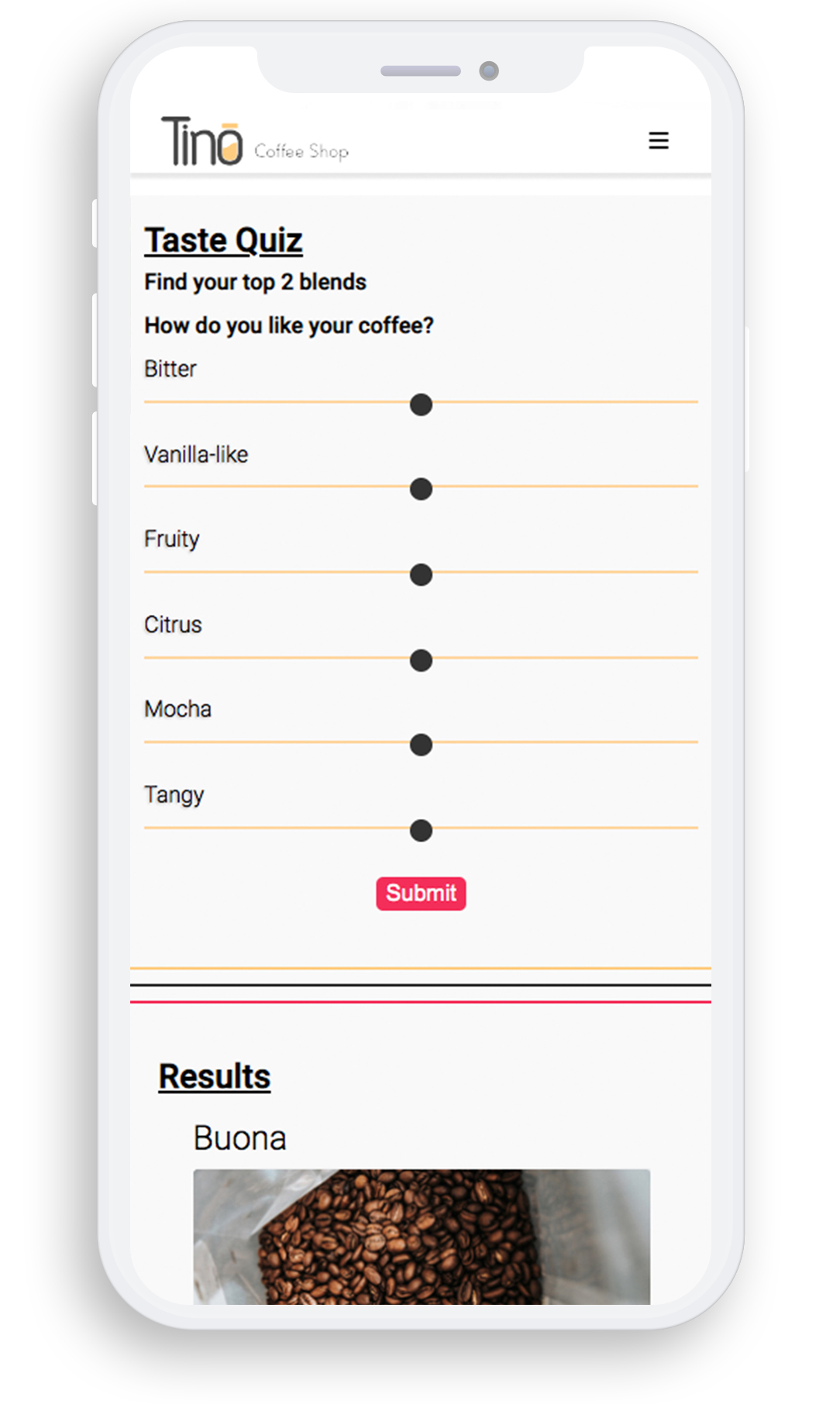
Consumers may find it hard to pick a blend with the overload of options; the taste quiz is designed to help users narrow down the countless blends so that they can easily make a decision.
-
Express JS + MongoDB
// Get all the user preferences from taste quiz
app.get('/tasteQuiz', async (req, res) => {
  try {
    // select the collection
    const collection = client.db('tino').collection('blends');

    // Retrieve all blends from the database at once using "toArray" to avoid multiple queries.
    const allBlends = await collection.find({}).toArray();

    // Create an array to store the total difference for each blend
    let blendDiffsArray = allBlends.map(item => {
      // Calculate the absolute differences for each taste attribute
      let blendOb = {
        bitter: Math.abs(item.bitter - req.query.bitter),
        vanillaLike: Math.abs(item.vanillaLike - req.query.vanillaLike),
        fruity: Math.abs(item.fruity - req.query.fruity),
        citrus: Math.abs(item.citrus - req.query.citrus),
        mocha: Math.abs(item.mocha - req.query.mocha),
        tangy: Math.abs(item.tangy - req.query.tangy)
      };

      // Sum the differences to determine how close this blend matches the user preferences
      let totalDifference = Object.values(blendOb).reduce((a, b) => a + b, 0);

      // Return an array [blendName, totalDifference] for sorting later
      return [item.name, totalDifference];
    });

    // Sort the array by the total difference in ascending order (least difference first)
    blendDiffsArray.sort((a, b) => a[1] - b[1]);

    // Extract the names of the top two blends (least total difference)
    const topTwoBlends = blendDiffsArray.slice(0, 2).map(blend => blend[0]);

    // Query the database to find the full details of the top two blends
    const returnBlends = await collection.find({ name: { $in: topTwoBlends } }).toArray();

    // Return the top two blends to the client
    res.send(returnBlends);

  } catch (error) {
    // Handle any errors (e.g., database connection, query issues) and return a 500 status
    console.error('Error retrieving blends:', error);
    res.status(500).send('An error occurred while retrieving blends.');
  }
});
Source Code
View Source Code
Email Marketing
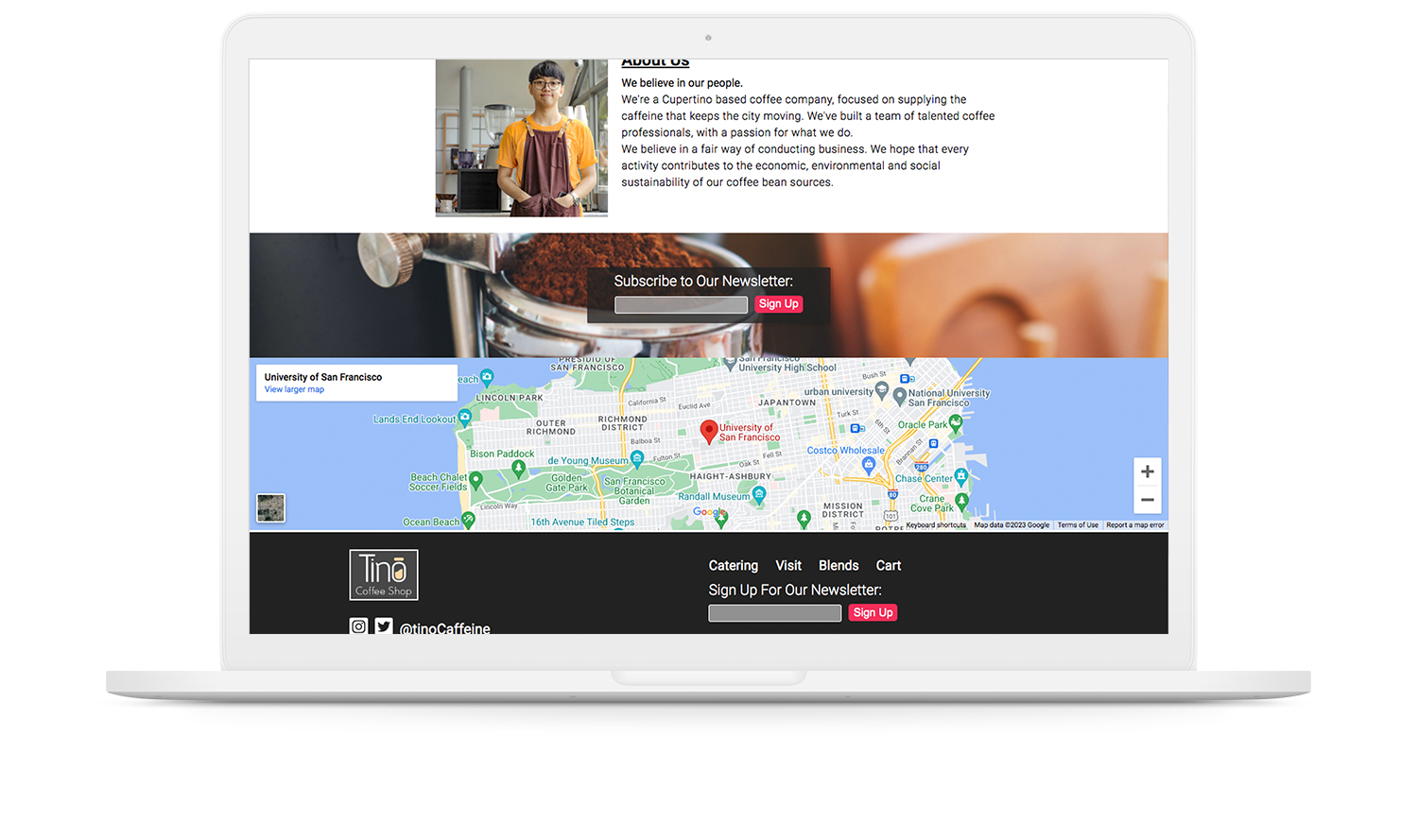
One of the main advantages of the website was the opportunity it brought for email marketing. 81% of small businesses rely on email as their primary customer acquisition channel.
A one-field form makes it quick and easy for an interested user to join the mailing list. The form is placed just before the FAQ on the “about” page, where the user is most likely to be interested in hearing more about the business.
The form is also placed on the footer of every page for easy access.
-
Express JS + MongoDB
export default function NewsletterSignUp() {
  const [newsletterEmailAddress, setNewsletterEmailAddress] = useState('');
  const [newsletterEmailAddressSignUpHeader, setNewsletterEmailAddressSignUpHeader] = useState('Subscribe to Our Newsletter:');

  // handle input field changes and update the email
  const handleNewsletterEmailFieldChange = (e) => {
    setNewsletterEmailAddress(e.target.value);
  };

  // handle the form submission
  const handleNewsletterSignUp = async (e) => {
    e.preventDefault(); // prevent form submit/page refresh

    try {
      const response = await fetch(https://thisWouldBeYourHostName/saveNewsletterEmailEndpoint? + new URLSearchParams({
        address: newsletterEmailAddress,
      }));

      // if request is successful, update the header message
      if (response.ok) {
        setNewsletterEmailAddressSignUpHeader('Thanks For Signing Up!');
      } else {
        setNewsletterEmailAddressSignUpHeader('Failed to sign up, please try again.');
      }

    } catch (error) {
      // catch fetch errors
      console.error('Error signing up for the newsletter:', error);
      setNewsletterEmailAddressSignUpHeader('An error occurred, please try again later.');
    } finally {
      // reset the email field after the request is handled
      setNewsletterEmailAddress('');
    }
  };
  return (
    <div className='solo-newsletter-sign-up' style={{ backgroundImage: "url('/images/newsletter/background.jpg')" }}>
      <div className='newsletter-sign-up-container negative'>
        <h3>{newsletterEmailAddressSignUpHeader}</h3>
        <input
          type='email'
          name='footer-newsletter-email'
          value={newsletterEmailAddress}
          onChange={handleNewsletterEmailFieldChange}
          placeholder='Enter your email'
        />
        <button
          type='button'
          onClick={handleNewsletterSignUp}
        >
          Sign Up
        </button>
      </div>
    </div>
  );
}
Source Code
View Source Code
Implement an E-Commerce System
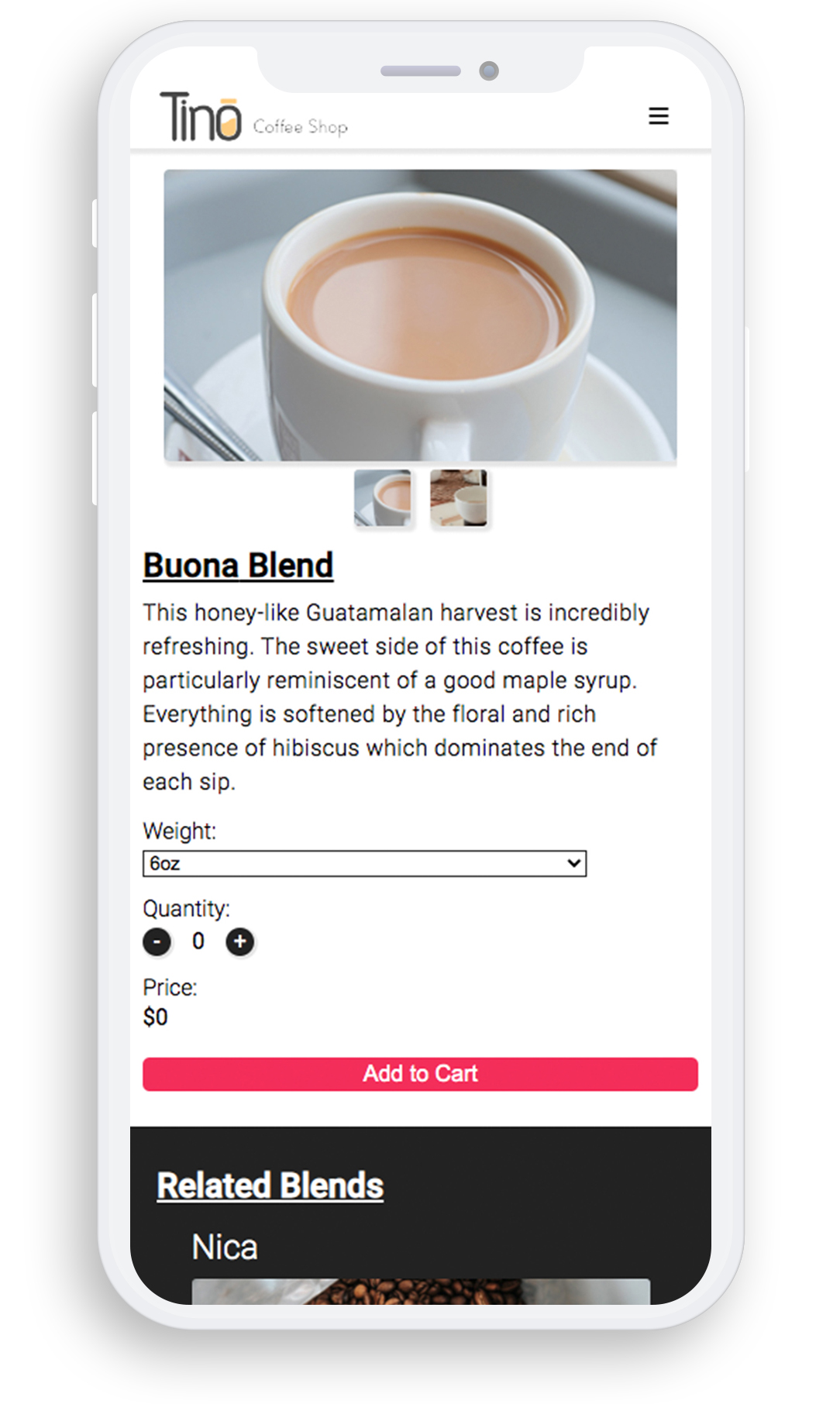
The simple interface is designed to be user friendly and intuitive, while enabling the business to sell coffee all over the world.
-
Redux Reducer
const cartReducer = (state = initState, action) => {

    switch(action.type) {
      add_to_cart
        case ADD_QUANTITY: {
            let addedItem = state.items.find(item => item.id === action.id);
            if (!addedItem) return state; // make sure item exists

            // if item already exists in cart
            let existed_item = state.addedItems.find(item => item.id === action.id);
            let newAddedItems;

            if (existed_item) {
                // increate quantity if already in cart
                newAddedItems = state.addedItems.map(item =>
                    item.id === action.id ? { ...item, quantity: item.quantity + 1 } : item
                );
            } else {
                // add new item to cart, set quantity to 1
                addedItem = { ...addedItem, quantity: 1 };
                newAddedItems = [...state.addedItems, addedItem];
            }

            // calculate new total price
            let newTotal = calculateTotal(newAddedItems);

            return {
                ...state,
                addedItems: newAddedItems,
                total: newTotal,
            };
        }

        case REMOVE_ITEM:
        case SUB_QUANTITY: {
            let addedItem = state.addedItems.find(item => item.id === action.id);
            if (!addedItem) return state; // make sure item exists

            let newAddedItems;

            if (action.type === SUB_QUANTITY && addedItem.quantity > 1) {
                // decrease quantity by 1
                newAddedItems = state.addedItems.map(item =>
                    item.id === action.id ? { ...item, quantity: item.quantity - 1 } : item
                );
            } else {
                // remove item from cart if quantity is 1 or if action is REMOVE_ITEM
                newAddedItems = state.addedItems.filter(item => item.id !== action.id);
            }

            // recalculate total price
            let newTotal = calculateTotal(newAddedItems);

            return {
                ...state,
                addedItems: newAddedItems,
                total: newTotal,
            };
        }

        default:
            return state; // return current state if no action matches
    }
};

// calculate total price of cart
const calculateTotal = (items) => {
    return items.reduce((total, item) => total + (item.price * item.quantity), 0);
};
A redux reducer handles the basic functionality of an online cart system.
Source Code
View Source Code
Online Bookkeeping System
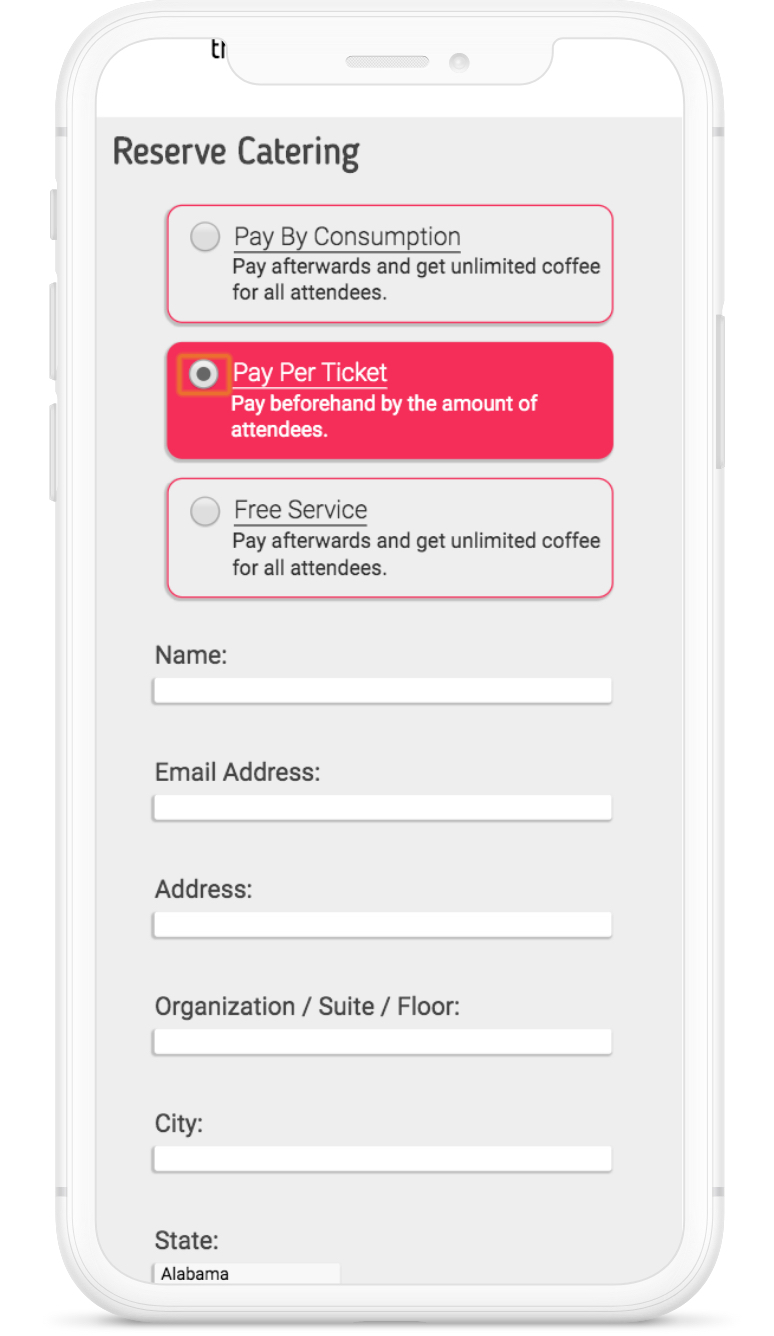
If an action is easy, more people are willing to take it. Requiring users to call or physically come in to the store just to schedule catering was sure to hurt their bottom line. For this reason it was important to include a detailed form to help automate the process.
It's important to not only store all of the submitted form data for the business, but also to set up notifications and reminders. Catering orders may be placed on the same day of an event, therefore we must use automatic email reminders to ensure the employees are informed and prepared.